Most small businesses hire a handful of times a year, which is exactly why hiring often has no process behind it. A role opens, a few CVs land in an inbox, and weeks pass before anyone replies. Good candidates take other offers in that gap. The good news is that a small team does not need an HR department to hire well. It needs a repeatable routine and one place where everything about a candidate lives. Here is a checklist for building both.
Write the role before you post it
Decide the must haves versus the nice to haves before applications arrive, not while reading them. A short, honest job description attracts fewer applicants but a higher proportion of the right ones. Be specific about the day to day work, the location or remote arrangement, and the pay range if you can share it. If the role is a contract rather than a permanent position, say so clearly, and if you are hiring contractors in the UK, record their IR35 status at the start rather than sorting it out after an offer has gone out. Once you have a description that works, save it as a template so the next similar vacancy starts from something good instead of a blank page.
Ask the right questions on the application form
A generic upload and a name field give you very little to filter on. Add two or three questions that matter for the role, such as right to work, notice period, or a specific certification. Answers are then attached to the application and comparable at a glance, which saves a round of emails asking each person for the same basic facts.
Centralise every application
Job boards, your careers page, and email all produce applications. If they land in different places, someone always gets missed. An applicant tracking system pulls every application into one pipeline, so nothing sits unread in a folder nobody checks. Wherever you advertise a role, point the Apply link at one application page, so every candidate arrives in the same place.
Set a response time and stick to it
Candidates judge a company by how it hires. A week of silence after applying reads as disorganisation, and your best candidates have other options. Decide how quickly you will acknowledge an application and how quickly you will tell people where they stand, then use a visual pipeline to see who is waiting. When each candidate sits on a board in a stage such as new, shortlisted, interview, or offered, a stalled application is obvious at a glance rather than something you discover a fortnight later. A candidate portal helps too, because applicants can check their own status and upcoming interviews without having to email you to ask.
Standardise the interview
Asking every candidate a different set of questions makes them impossible to compare fairly. Agree a shortlist of questions before interviews start, and give each candidate a rating afterwards while the conversation is fresh. Keep the notes against the candidate record rather than in someone's inbox, so anyone else involved in the decision can read them. Booking is part of the process too. Sending a calendar invite with the location or a video link automatically, whether the interview runs on Google Meet, Microsoft Teams, or Zoom, removes a surprising amount of back and forth.
Use screening to filter and not to decide
Automated CV parsing can turn an uploaded CV into a structured candidate profile, so nobody retypes work history and skills. Screening and matching tools can then rank a large applicant pool against the requirements of a job, which matters when one role attracts hundreds of applications. Treat the output as a second opinion. A fit score with a list of strengths and gaps is useful for deciding who to read first, but the decision itself should stay with a person who reads the shortlist properly and understands context that a score cannot see.
Keep a proper record
Interview notes, ratings, offer details, and the outcome of each application should live against the candidate, not scattered across email threads that get deleted. That protects you if a hiring decision is ever challenged, and it means the next person to hire for a similar role is not starting from zero. Candidates you liked but could not hire this time are worth keeping in your talent pool, provided you handle their data properly.
Respect the data you hold
Candidate information is personal data, and you are responsible for it. Have a clear retention period, record consent, and be ready to delete a candidate's data if they ask you to. Building those habits in from the start is far easier than trying to clean up a shared inbox and a folder of CVs later. Your recruitment software should make this routine, with retention policies, consent tracking, and a straightforward way to handle deletion requests.
Wizard Application's recruitment ATS covers the pipeline, interview booking, candidate profiles, and notes in one place, so small business hiring runs on a process instead of a shared inbox.
What this looks like in practice
Take a single vacancy for an account manager. You create it from a saved template, add the application questions you care about, and publish it to your careers page. Wherever else you advertise it, the Apply link sends candidates to the same application page, so every application lands in one pipeline instead of three inboxes. Each candidate appears on a Kanban board that you can drag between stages, and the stages themselves can be renamed or added to so they match how your business actually hires.
When a hundred applications come in for one role, the AI screening and matching tools, available on the Professional and Enterprise plans, score candidates against the job so the first pass is a shortlist rather than a stack of unopened CVs. Each result shows a fit score, a recommendation, and a plain breakdown of strengths and gaps. The recruiter still reads every shortlisted profile and makes the actual call, but that read happens on the twenty candidates worth reading, not all hundred.
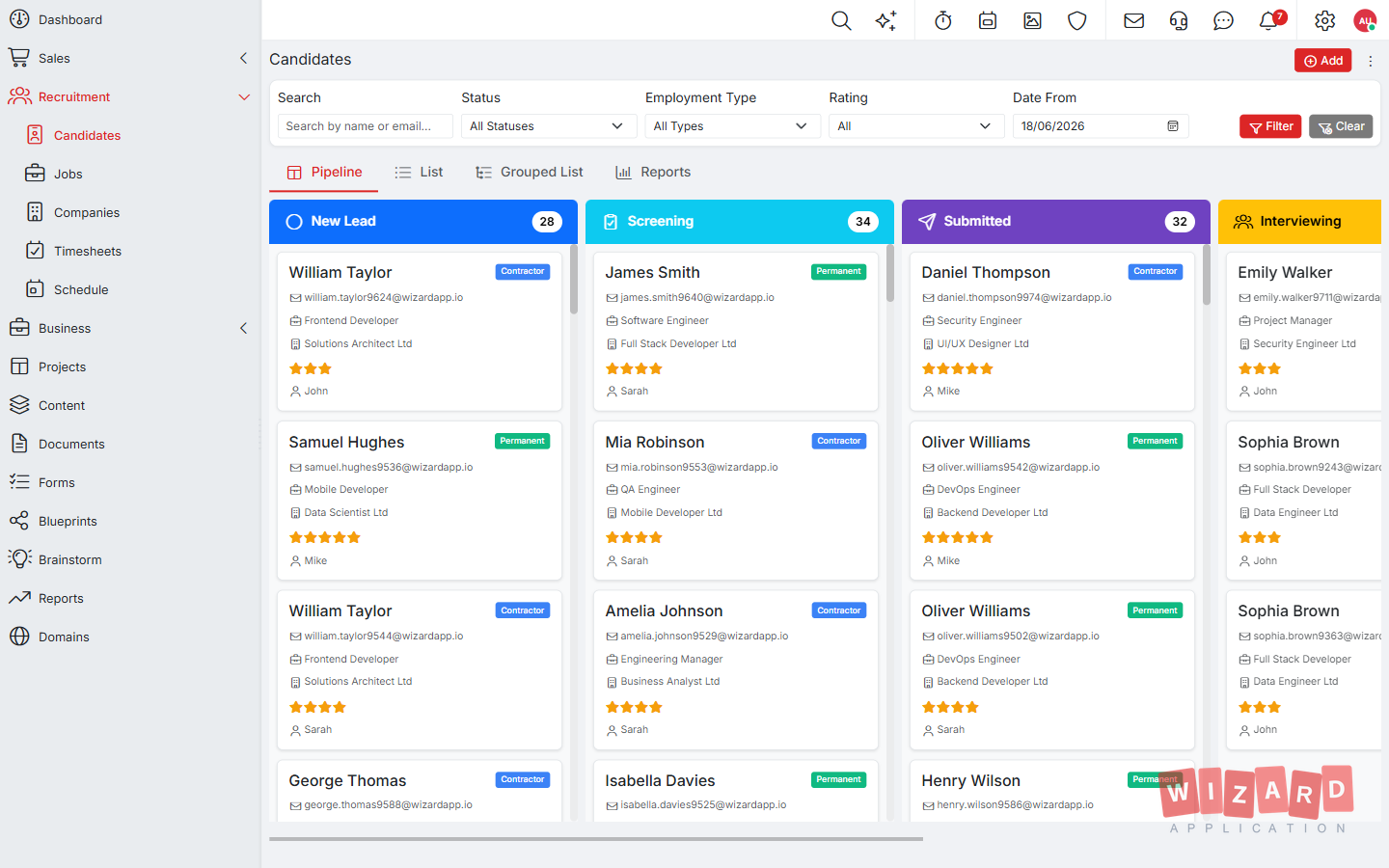
For the people who make it through, interviews are booked from the same place. The candidate receives the date, time, and meeting link by email and can see the interview in their portal. Afterwards the interviewer records a rating and adds notes to the candidate record, so if three people speak to someone across a week, their views sit together rather than in three separate threads. If the candidate is not right, their status is updated and the history stays with them, so six months later, when a similar role opens, there is a record to check rather than a vague memory of how it went.
The result is a hiring process a small team can run consistently, role after role, without a spreadsheet tracking candidate stages on the side.
A short checklist to keep
Before your next vacancy goes live, run through it once. Is the role written with clear must haves? Are the application questions set? Will every source land in one pipeline? Is there a response time you can actually meet? Are the interview questions and the rating agreed in advance? And do you know how long you will keep candidate data and why? If the answer to each is yes, you are already ahead of most businesses your size, and the Starter plan includes the recruitment ATS with unlimited job postings, so you can try it on a real vacancy at no cost.
Frequently asked questions
Does a small business need an applicant tracking system?
Once applications arrive from more than one place, it helps. It gives every application one home, so candidates from your careers page and wherever else you advertise land in one pipeline and nobody is missed.
Should AI screening decide who gets hired?
No. Use the score to decide who to read first and keep the decision with a person. AI screening is on the Professional and Enterprise plans.
Can I try the recruitment ATS for free?
Yes. The free Starter plan includes the recruitment ATS with unlimited job postings.