Wizard Tag Tap it and know who has it.
A 22 mm NFC tag with the Wizard W. Stick it on anything your business owns. One tap with a phone opens it in Wizard Application, ready to check out, hand over or bring back.
Up and running in seconds
Stick it
Small and slim enough for keys, laptops and tools. Stick it wherever a phone can reach it.
Set it up
Tap it with the Wizard Application app and pick the asset. It takes seconds.
Tap it
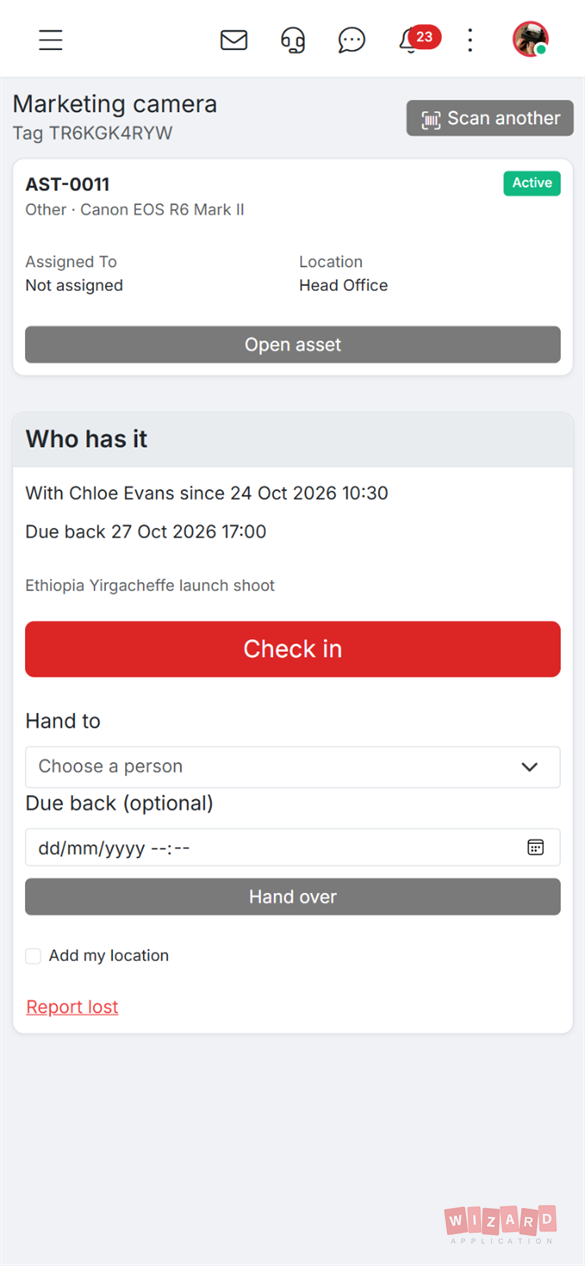
Tap the tag with a phone to open the asset, check it out, check it in or hand it to a colleague.
Built so it can't be faked
A Wizard Tag only ever opens the asset it was set up for, and only a real tap counts as a scan.
- Locked once it's set up, so nobody can change where it points
- A tap counter on the chip means a copied link can't be used to fake a check-out
- Team members can only check something out, in or over just after scanning it
One price per tag
£1.99 per tag
- Minimum order of 10 tags
- Free delivery to the UK and Ireland, £5 elsewhere
- Order Wizard Tags from inside Wizard Application or when you sign up.
Your phone is the reader
The Wizard Application app reads and sets up your Wizard Tags. Download it free for iPhone and Android, sign in to your workspace and every tag your team taps opens the right asset.
- iPhone and Android phones with NFC
- Android phones can also scan tags in Chrome
- No tags? Print QR labels or use a USB reader

Ready to get started?
Discover how Wizard Application can streamline your business. Start free today.
Common questions.
A 22 mm round NFC tag with the Wizard W on it. You stick it on an asset and set it up with the Wizard Application app. From then on a tap with a phone opens that asset.
iPhone and Android phones with NFC, using the Wizard Application app. Android phones can also scan tags in Chrome.
No. Each Wizard Tag is locked as soon as it is set up, so nobody can change where it points. A lost or damaged tag can be revoked and replaced with a new one.
£1.99 per tag, with a minimum order of 10. Delivery is free to the UK and Ireland and £5 elsewhere.
You order Wizard Tags when you sign up or from inside Wizard Application, then set each one up from your phone in seconds.
No. You can track assets without tags, print QR labels for them, or use a USB reader at a desk. Wizard Tags make checking things out and in a single tap.