Decide exactly who can see and do what.
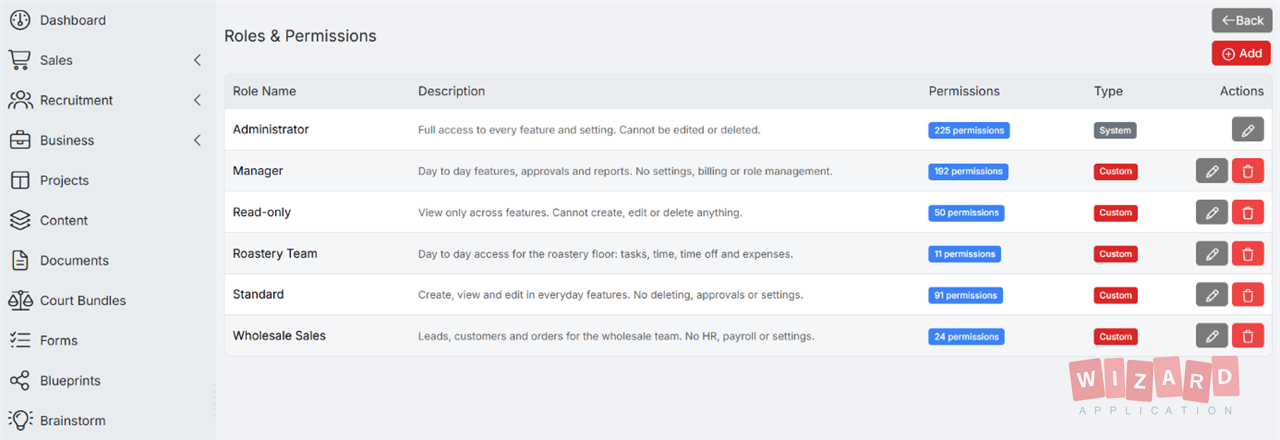
Granular role-based access control across every module of the platform. Build user groups for any team, role, or department, and dial in permissions down to the individual action, view, edit, delete, or admin.
Three pillars of access control.
User groups, granular per-module permissions, and reusable roles, everything you need to give the right people the right access.
User Groups
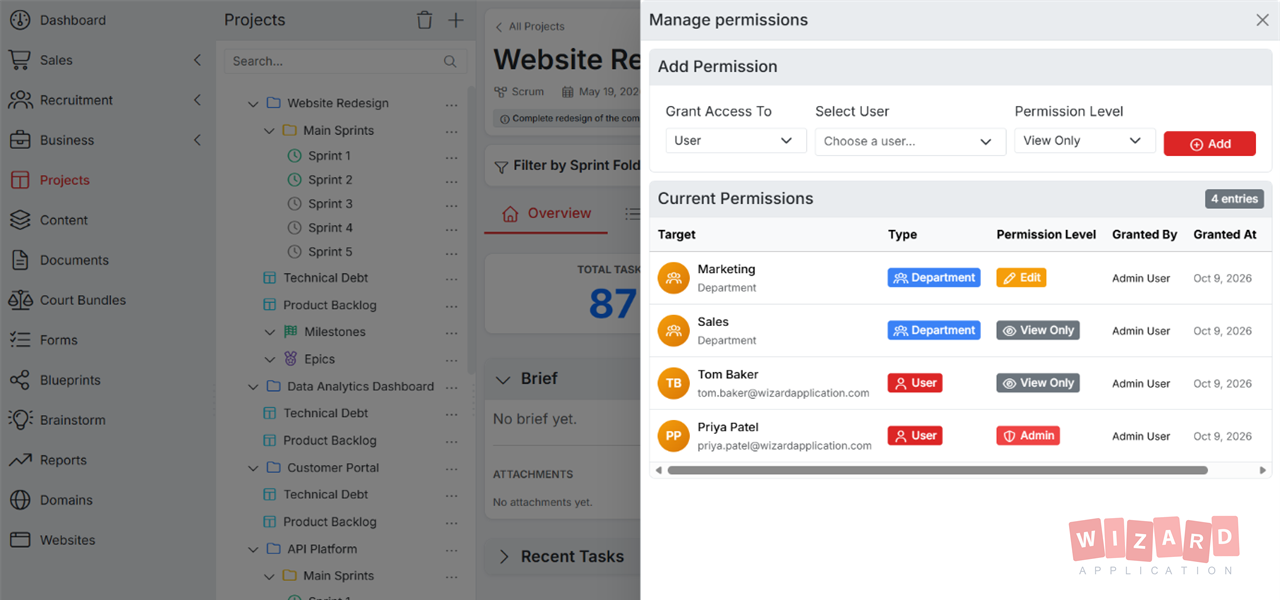
Group users by team, department, function, or anything else. Assign permissions to the group once and every member inherits them.
- Unlimited groups per workspace
- Bulk-assign users to one or many groups
- Internal, external, and contractor classes
- Inheritance from parent groups
Granular Permissions
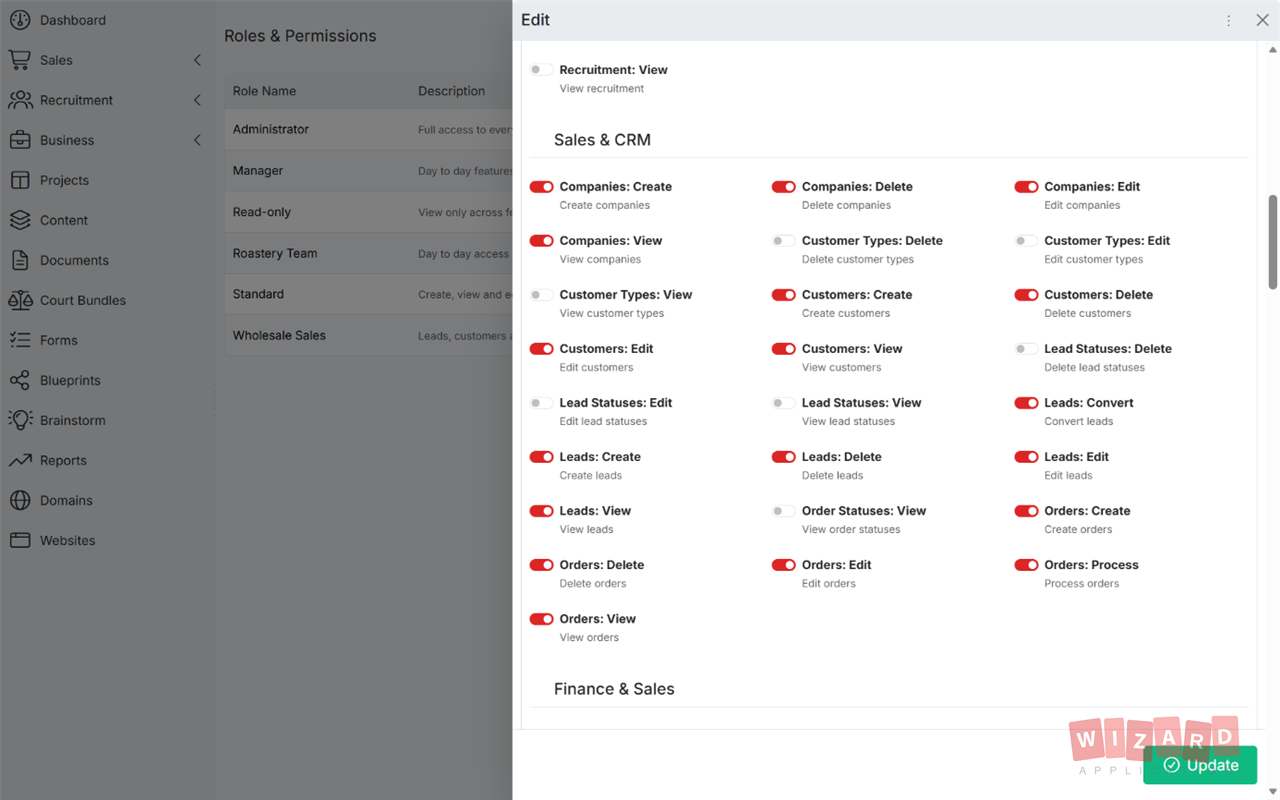
Lock down every module independently. Pick exactly which actions a group can perform, view, edit, delete, or admin, for each part of the platform.
- Per-module view, edit, delete, admin
- Field-level visibility for sensitive data
- Record ownership & assignment rules
- Approval gates for high-risk actions
Reusable Roles
Build roles once and apply them anywhere. Pre-set templates for common patterns like Manager, Sales, HR, Finance, or Read-Only.
- Custom role definitions
- Pre-built role templates
- Mix-and-match permissions per role
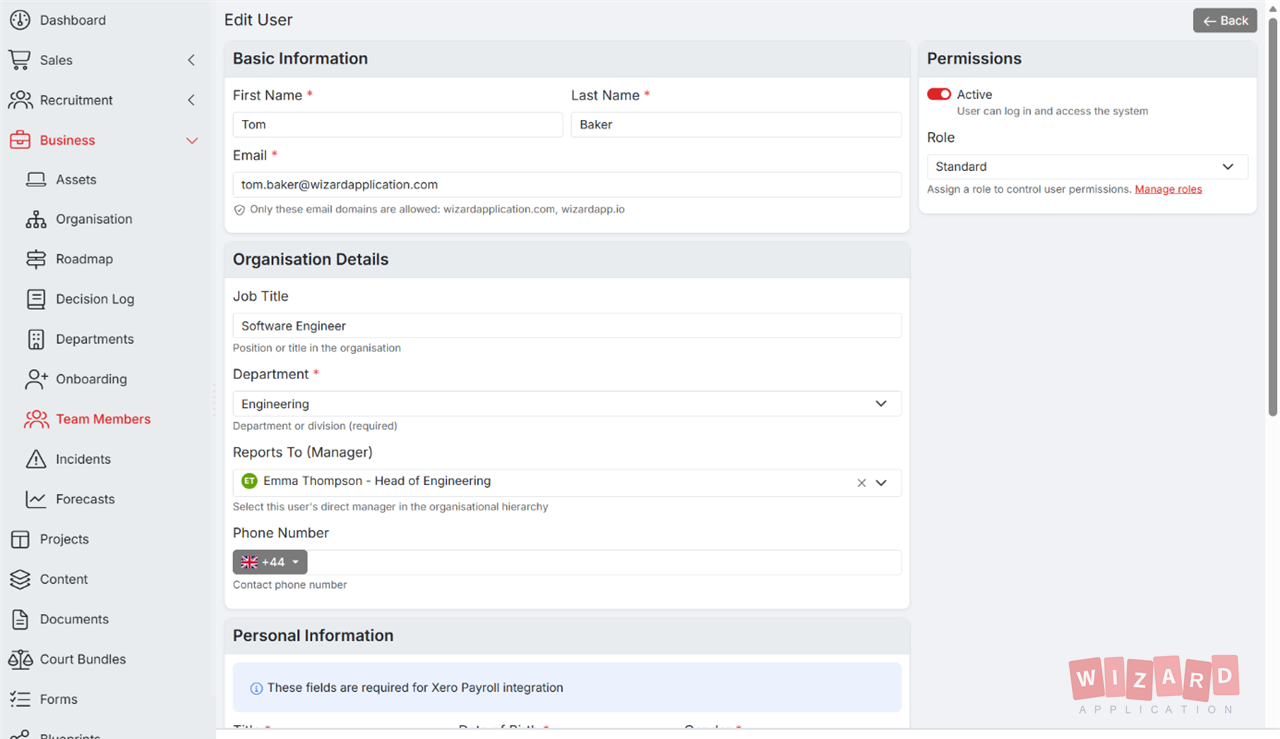
- Apply to any user or group
Organise people the way your business actually works.
Forget rigid role hierarchies. Create groups for your sales team, your client portals, your finance approvers, your seasonal contractors, whoever needs access, and assign permissions per group. Add or remove members in seconds and the right access follows automatically.
-
Any team, any structure Group by department, project, region, or function, no schema to learn.
-
Nested hierarchies Inherit permissions from parent groups so you only configure what's different.
-
Move users in one click Promote, transfer, or off-board a user and access updates instantly across every module.
Four levels of access, every module.
Every module on the platform, CRM, HR, Documents, Reports, Settings, and more, supports the same four-tier permission model. Mix and match for any group to build exactly the access pattern you need.
-
View See records and lists, no edits.
-
Edit Create and update records the user can see.
-
Admin Configure module settings, manage other users' access, see everything.
Built for real-world access patterns.
Six common scenarios our users solve in minutes, without an admin call or a support ticket.
Department-Level Access
Sales sees the pipeline, HR sees employee files, Finance sees the books. Nobody sees everything unless you say so.
Client & Vendor Portals
Give external partners limited views into specific projects, invoices, or documents, without them touching anything else.
Contractor Onboarding
Spin up a contractor group with time-boxed access. Permissions revoke automatically when the engagement ends.
Compliance & ISO
Demonstrate least-privilege access for ISO 27001, GDPR, and SOC 2 audits with the built-in permission audit log.
Module-Level Toggles
Disable entire modules for groups that don't need them, cleaner UI, fewer support questions, less attack surface.
Audit Trail
Every permission change is logged with who, what, and when. Replay history to investigate incidents or prep for review.
Everything Your Business Needs
One subscription. One login. Zero limitations. Replace your entire software stack with a platform built to scale with you.
Brainstorm
A freeform visual canvas for ideas and concepts: idea cards, sticky notes, mood board images, group frames, and ideas generated by AI.
Explore BrainstormBusiness Roadmap
Plan and visualise business strategy with timeline and milestone tracking.
Explore Business RoadmapCommunications
Send newsletters, announcements, and bulk communications to contacts.
Explore CommunicationsDocuments
Document storage, file sharing, version control, and folder organisation.
Explore DocumentsIncident Management
Incident management with severity-based SLAs, root-cause documentation, full audit trail, and security incident flagging. Aligned with ISO 27001 Annex A.16.
Explore Incident ManagementMedia Library
Centralised media management with tagging, search, and organisation.
Explore Media LibraryOrganisation Chart
Visualise company structure with interactive org charts and reporting lines.
Explore Organisation ChartPermissions & User Groups
User groups, role-based permissions, and granular access control to keep your workspace secure.
Explore Permissions & User GroupsProject Management
Project management with sprints, backlogs, task boards, and team collaboration.
Explore Project ManagementRecruitment
Full applicant tracking system with job postings, candidate management, and hiring workflows.
Explore RecruitmentReady to get started?
Discover how Wizard Application can streamline your team's work. Start your free trial today.
Common questions.
Yes. User groups, role-based access, and the per-module permission matrix are core to running a multi-user workspace safely, so they ship with every plan, at no extra cost.
Four levels per module, View, Edit, Delete, and Admin, combined with field-level visibility, record ownership rules, and approval gates. You can model anything from open-team collaboration to lock-down least-privilege access.
Yes. A user inherits the union of permissions from every group they belong to. If a user is in both 'Sales' and 'Managers', they get the combined access of both.
Every group change, permission grant or revoke, and access event is logged with the actor, timestamp, and target. Useful for ISO 27001, GDPR, and SOC 2 reviews.